Maccy is a simple but effective clipboard manager
Reading Time: 1-2 minutes
When Apple enabled the ability on iOS and macOS to automatically copy and make available copied notes on all devices connected to the same iCloud account, I rejoiced quite a bit.
I used that feature, Handoff, for a long time because very often I found myself copying a file, a sentence without having to necessarily synchronize the state of the entire app on the cloud. After a few months, however, this ‘joy’ slowly faded away: perhaps because more and more apps supported Handoff, so there was no need to copy the link if it was enough to click on the icon of the same app on another device and everything was immediately synchronized quickly.
Or maybe because sometimes it didn’t work. In general, the biggest problem was the lack of a way to collect my notes of a few words quickly, without having to swap them from one device to another or from one app to another.
I didn’t know that there was a category of applications called clipboard managers.
And I didn’t verify even know that they cost almost at least €5-10. But then on Product Hunt I found Maccy, a lightweight and open source clipboard manager. So light that it doesn’t even have a window interface. It works only with a little window that opens from the top status bar, on macOS.
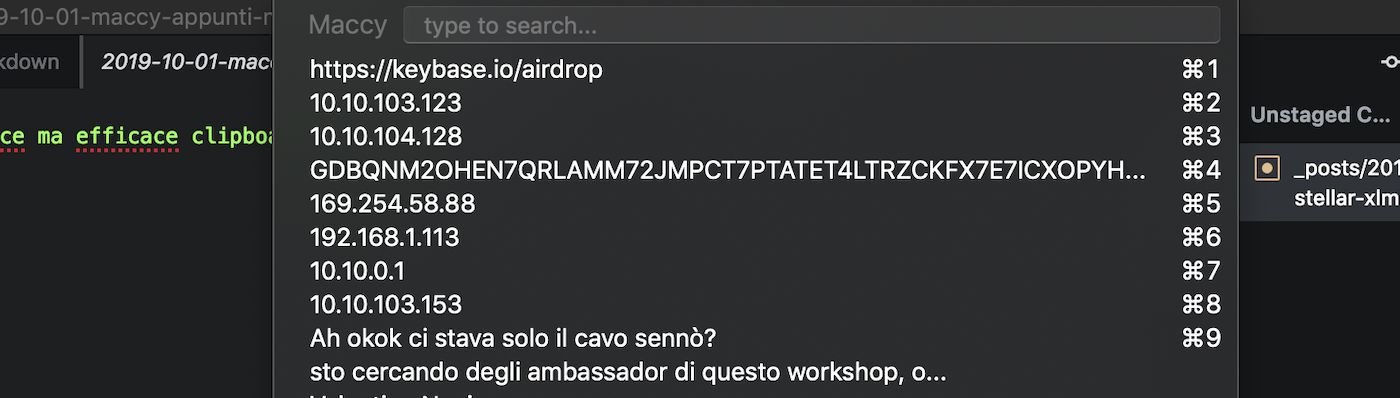
What it does is very simple to explain: it remembers all notes copied during a session. It remembers them even if I log out or turn off the computer completely. To delete notes just click the ‘clear’ button in the drop-down menu that opens. I don’t know what the maximum limit of notes it can keep is, probably thousands, which can be searched easily because the first line of the little window is actually a search bar.
You can delete a single note, by pressing alt + delete, but only from the next release (the developer has already listened to user feedback). Of course, a sort of classification of the most searched notes, perhaps pinned at the top, would have been useful - meanwhile I asked for it. For now it is just a list in chronological order. But for zero euros and maximum ease, some compromises can be accepted.
Maccy is available for macOS at this link, free.


Giacomo Barbieri
Head of Growth at Routescan. Building at the intersection of crypto infrastructure and AI agents.